
Table of contents
The “Detail” page
All core information in IDIA Know-Your-Customer is linked via the customer number and thus easily accessible in the provided data record. This also enables quick access to original documents from the registers. The “Detail” page contains the following sections:
- Company
- Register changes
- Pre-registrations in the register
- Mastery
- Ownership structure
- Balance sheet
- Deletion (only in case of relocation or conversion)
Company
The first section, “Company,” in IDIA Know Your Customer lists the company name, its legal form, and its registration number. One of the key figures listed is the equity capital (or, in the case of a limited partnership, the limited partner’s capital). Example:
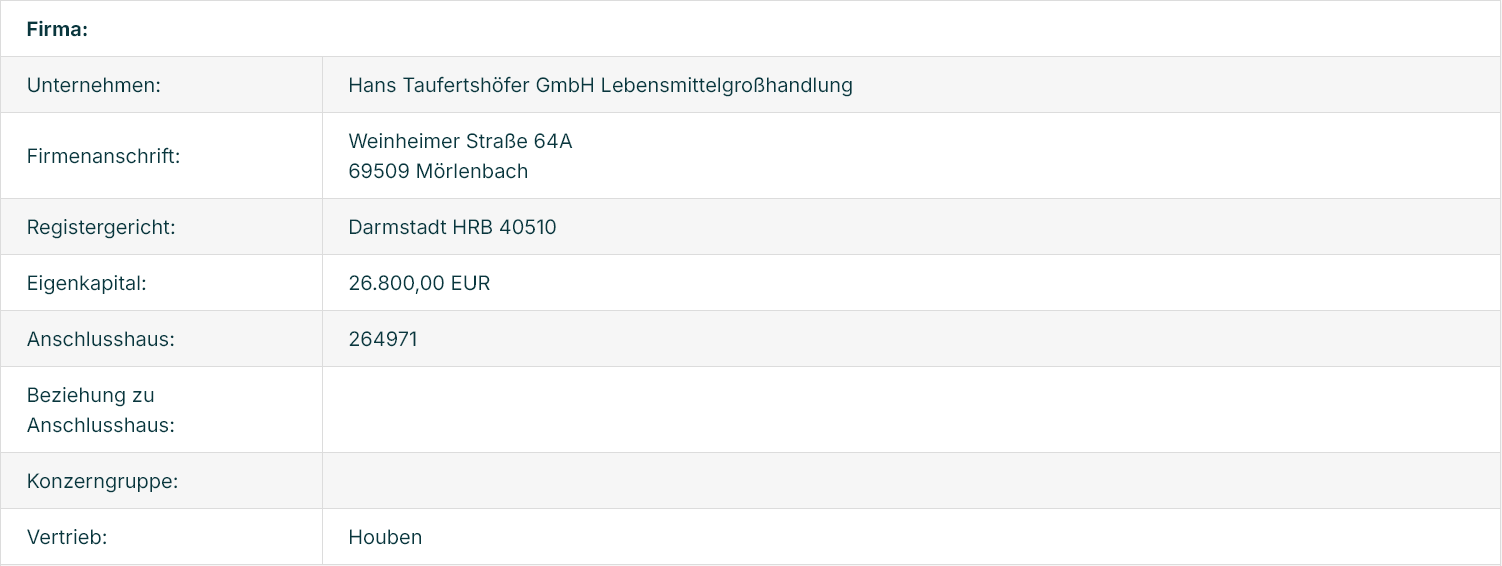
The web application lists not only direct customers but also other company links. These can include, for example, general partners, holding companies, controlling companies, or intermediate companies in the ownership chain. Therefore, there are always companies with customer numbers (here, affiliated company) and those without, which in many cases are not even included in the master data. This IDIA web application thus creates two alternative groups: customers or (in layman’s terms) “non-customers,” i.e., companies with a customer number or without a customer number. If there is no customer number, employees must be able to immediately recognize the relationship between a non-customer and a registered customer. If the “Customer Number” field (affiliated company) is empty, it is a non-customer, which is described in keywords in the following “Relationship to Affiliated Company” field (e.g., shareholder or general partner of affiliated company XY, etc.).
To provide a quick overview of complex and hidden interrelationships, a corporate group can be displayed. These don’t necessarily have to be nationally known corporations like Oetker or industry-specific companies like Splendid Drinks; corporate group overviews are particularly helpful for smaller groups (e.g., HoWi, Geins, or AlpenPartner). Further details will be explained in the sections on searching for and displaying corporate groups.
Since IDIA (IDIA-Know-Your-Customer) is a database application, specific groups of employees from a company can also be added. Following consultation, the sales staff are listed here in the FürSie eG web application. Other assignments can also be included upon customer request. Therefore, it is technically possible to list all companies associated with a sales employee.
If the company is a GmbH & Co. KG (limited partnership with a limited liability company as general partner), all general partner companies are also displayed. A good example is Otto Pachmayr GmbH & Co. Mineralwasser KG:
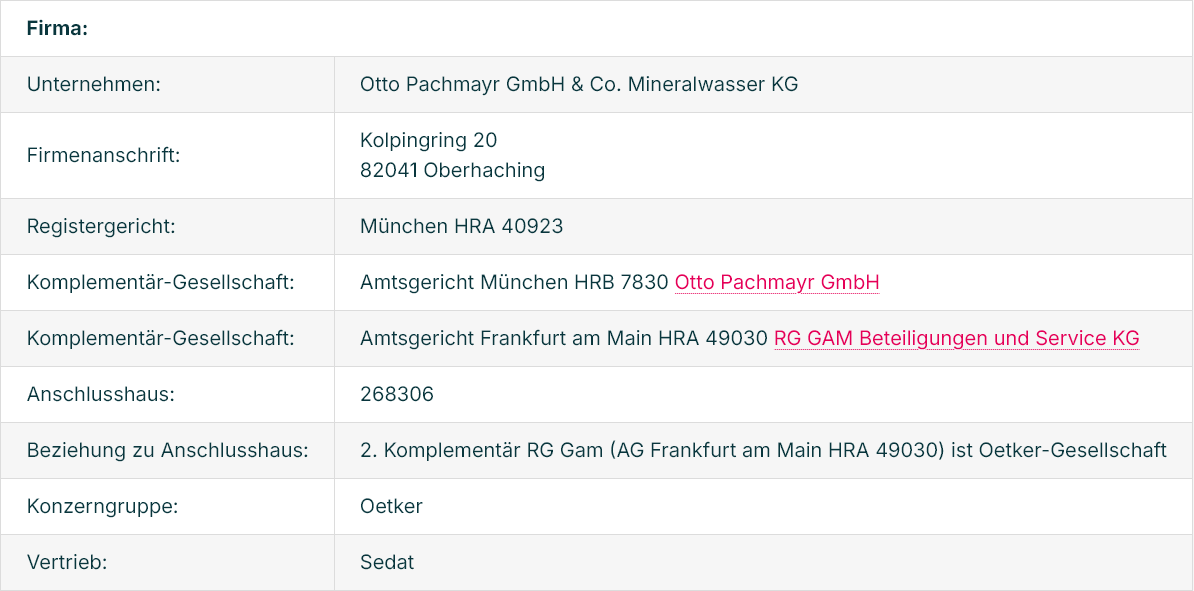
Many corporate master data systems can only process one general partner at most. Here, 1:n relationships, meaning any number of them, can be represented. Pachmayr KG not only has the usual administrative general partner GmbH, but also a second general partner in the legal form of a limited partnership: RG GAM Beteiligung und Service KG, which can be accessed with a single click, revealing Oetker.
Register changes
For every company listed in the web application, there is at least one entry in the commercial register. The most recent entry is always displayed under “Register Changes” with the date “Last Change” (here, for example, Hans Taufertshöfer GmbH):
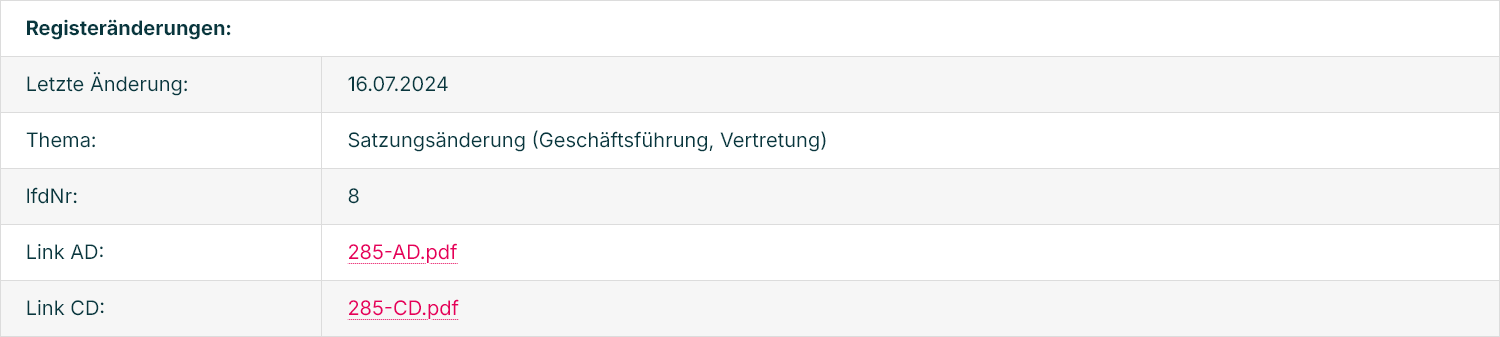
The content of the register entry is summarized using keywords related to the topic. The most frequent entry concerns changes in representation. Using this keyword, the content of the register entry is immediately apparent without having to open the link to the original entry. All entries in the commercial register are numbered sequentially, with the serial number being the most recent. There are two important commercial register extracts: the current document (AD), which contains only currently valid entries, and the chronological document (CD). Both original documents are stored. The AD link leads to the AD extract, and the CD link leads to the CD extract. When a company is dissolved, there are no longer any currently valid entries, and the AD extract disappears from the register. However, the CD extract remains in the register. If an old entry in the CD extract becomes invalid, it is not completely deleted but only underlined in red (invalid).
Pre-registrations in the register
The register entries are not overwritten but stored as historical records. The date of the initial entry is shown as the last change. The content of the preliminary announcement is summarized as a topic using keywords. The serial number indicates the number of entries in column 1 of the chronological printout (CD).

Mastery
If a corporate agreement (control or profit transfer agreement) exists, the controlling company is named here (in this example there is no control).

Ownership structure
The ownership structure is summarized by three pieces of information. The “Shareholders” field provides a summary of the ownership structure of this company.

Both natural and legal persons are mentioned. The term “shareholder” is used broadly here. It encompasses both the formal concept of a shareholder in a GmbH (limited liability company) or UG (entrepreneurial company) and the economic concept of an owner as the beneficial owner, i.e., the limited partner in a KG (limited partnership). The date of the last change of ownership is also shown. This is the date the shareholders were registered in the commercial register (filing/registration date). The date of the notarization of the shareholders’ list precedes this and is not considered here.
If it is a GmbH or UG (as in the example), then the “Link to Shareholder List” field is populated and leads to the document filed with the commercial register. If it is a KG (limited partnership), there is no formal shareholder list. The limited partners mentioned are already listed in the AD and CD extracts, therefore the field is empty.
Balance sheet
Key information about the balance sheet is provided, namely the last financial year that was published or filed.

The date of publication or filing in the commercial register is then shown as the last publication date. An important key figure is the IDIA (Internal Value Added). This value indicates how long the balance sheet publication period has been. A year is the standard assumption (§ 325 HGB). If the last balance sheet date is December 31, 2022, then the value reaches zero on December 31, 2023. If companies publish mid-year, i.e., before the end of the first year, the value is positive and falls within the legally required period, which is often not observed in practice. In the example, publication occurred as early as the eighth month (August 9, 2023) after the last balance sheet date, a very good value of +175. In practice, group companies and cooperatives often have positive balance sheet values mid-year. Many companies use the calendar year as their financial year. However, this is not legally mandatory; a financial year other than the calendar year can also be chosen. If a fiscal year ends on January 31st, then the balance sheet value is zero on January 31st of the following year. This method of calculation makes all balance sheet values comparable (a purely calendar date is not comparable).
Deletion
When a business relationship with a customer ends, that customer is removed from the display in this web tool. One reason for a terminated business relationship is, for example, the closure of the business and its subsequent removal from the register. However, there are also purely formal deletions. If a company relocates to the district of a different commercial register (change of registered office), it is deleted from the old register and listed as a new entry in the new register, even though it is not a newly founded company from an economic perspective. Another reason for a formal deletion is a merger (or a change of legal form) with another company. In this case, the deletion from the old register is only the formal end. Economically, the company is taken over by the new legal entity and continued as part of its business operations. Whenever a deletion is purely formal, i.e., in the case of a relocation or merger, the “Deletion” section also appears. Here is an example of DMT GmbH & Co. KG:
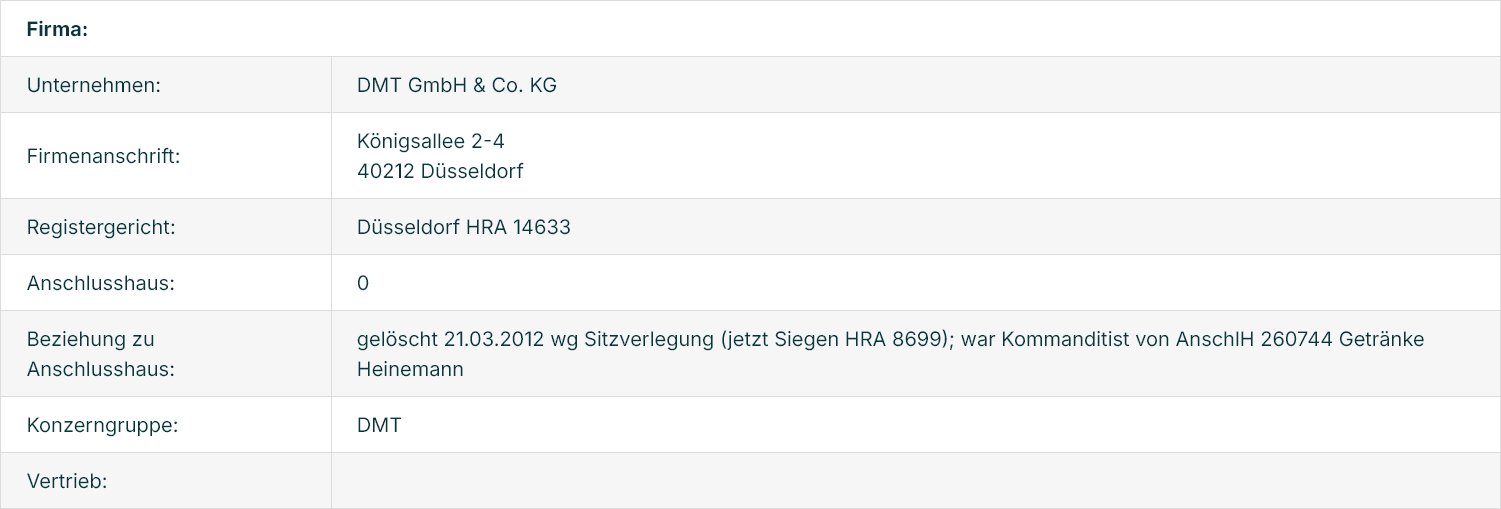
The first section, under the point “Relationship to the affiliated building,” already mentions the relocation of the office. Additionally, a section on “Deletion” now appears:

The date of deletion from the register and the reason for the deletion are stated. In this example, it’s a relocation of the company’s headquarters from Düsseldorf to Siegen. With one click, you can access the information about the relocated company.
Current commercial register extracts regularly list companies that have been deleted. Why is this? Here’s an example from Schallenberg Getränke GmbH & Co. KG in Bonn. The extract from the commercial register, accessed on February 2, 2024, states the following about the limited partner:

The Düsseldorf-based DMT GmbH & Co. KG has been dissolved since 2012. However, the registrar in Bonn is unaware of this. The registrar in Düsseldorf is also unaware of the entry in Bonn. Consequently, the courts cannot correct these errors. If a user views the AD extract and searches the digital commercial register for Düsseldorf Local Court HRA 14633, no results are found. This creates the (unjustified) impression that the IDIA web application has proven inaccurate during a check. Only when the user selects “also dissolved companies” in the official commercial register search does the relocation of the registered office to Siegen become apparent. To avoid this confusion for the user, certain dissolved companies, i.e., those that have changed their registered office or undergone a transformation (merger, change of legal form), are also displayed here.
